n8n vs Zapier vs Make: Which Automation Tool Fits You?
Three tools, three billing models, and one decision that depends on how your workflows are shaped rather than which name you know.
Zapier is the easiest, Make is the most flexible for the price, and n8n gives the most control if you can self host. The right pick depends on the shape of your workflows and your budget, not on which name you have heard most often.
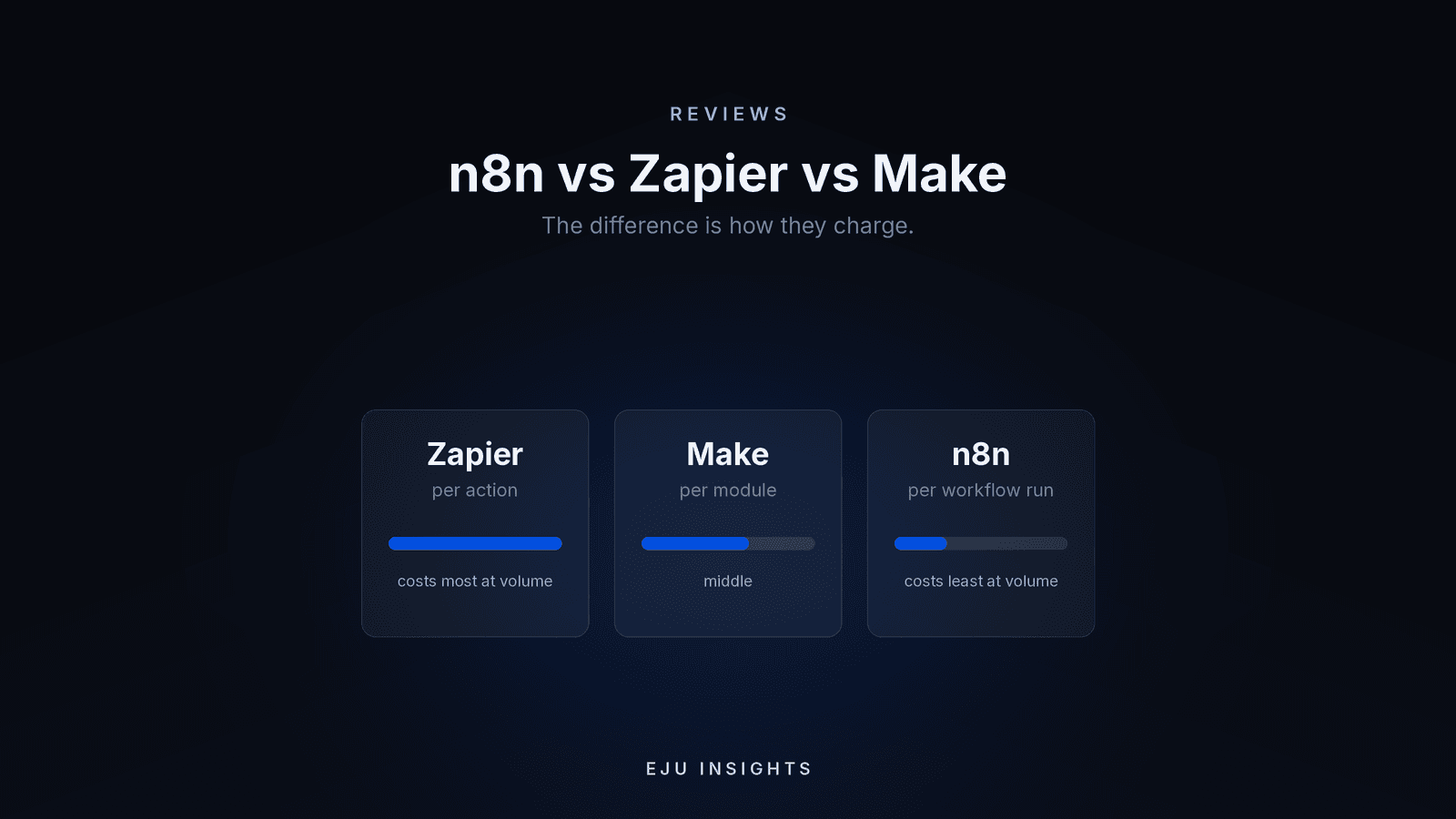
The feature lists of all three look similar, which is why most comparisons are useless. The decision that actually matters is how each one charges, because that single difference can change your bill by a factor of ten for identical work.
Prices below were checked in August 2026. All three vendors revise pricing regularly, so confirm the current figures before committing.
How does each one charge?
Zapier charges per task, where a task is one action that runs successfully. A five step Zap running 500 times uses roughly 2,500 tasks. Triggers and filters do not count.
Make charges per credit, and a credit is one module call. Make counts more things than Zapier does: the trigger counts, filters count, and every iteration of a loop counts. The same workflow can consume noticeably more units on Make than on Zapier, but the units are much cheaper.
n8n charges per execution, which is one complete run of a workflow no matter how many steps are inside it. That same five step workflow running 500 times uses 500 executions, not 2,500.
Sit with that last one for a moment. It means long, complicated workflows are cheap on n8n and expensive on Zapier, and it is the single most useful fact in this comparison.
What do they cost?
| Zapier | Make | n8n | |
|---|---|---|---|
| Free tier | 100 tasks a month, two step workflows | 1,000 credits a month, 2 active scenarios | No permanent free cloud tier, but the self hosted edition is free software |
| Entry paid plan | Professional, around 20 dollars a month billed annually (about 30 monthly) for 750 tasks | Core, roughly 9 to 12 dollars a month for 10,000 credits | Starter, around 20 to 24 euros a month for 2,500 executions |
| Next tier | Team, roughly 69 dollars annually or 103 monthly for 2,000 tasks | Pro around 16 to 21 dollars, Teams around 29 to 38 | Pro around 50 to 60 euros for 10,000 executions |
| Self hosting | Not available | Not available | Yes, community edition is free software on your own server |
| Billing unit | One action | One module call, including triggers and filters | One whole workflow run |
Two changes worth knowing. Zapier moved AI steps to model based task rates in mid 2026, so a single AI step can now consume several tasks rather than one, which makes AI heavy Zaps considerably more expensive than they used to be. And Make renamed operations to credits in late 2025, so older guides describing operations are describing the same thing.
Zapier: easiest, and you pay for that
Strengths. The largest app catalogue by a wide margin, in the thousands rather than the hundreds. A genuinely simple builder that a non technical person can use on their first afternoon. Mature, reliable, and well documented.
Weaknesses. It is the most expensive per unit of work, and the gap widens as workflows get longer, because every step is billed. Complex branching is possible but awkward. Exceeding your tasks means overage charges or an upgrade.
Choose it when your workflows are short, your volume is modest, nobody on the team is technical, and you need an integration that only Zapier supports.
Make: most capability per pound
Strengths. A visual canvas that makes branching, looping, and error paths easy to see. Routers and iterators handle jobs that would need several separate Zaps. Very cheap per unit at typical small business volumes.
Weaknesses. The learning curve is real, and the canvas gets messy fast without discipline. Credit counting surprises people, because triggers, filters, and every loop iteration consume credits. A scenario that looks like three steps can burn ten credits per run.
Choose it when you want serious capability without a big budget, your workflows involve conditions and branches, and someone on the team enjoys building things.
n8n: most control, if someone owns it
Strengths. Execution based billing makes long workflows dramatically cheaper. Unlimited users and workflows on every plan. Code nodes when the visual approach runs out. And it can be self hosted, which matters for data residency, regulated work, or anyone who dislikes sending customer records through a third party.
Weaknesses. Self hosting means you own uptime, backups, updates, and security. The app catalogue is smaller, in the hundreds rather than the thousands, though it covers the major platforms. On cloud plans, hitting your execution cap can pause workflows rather than charge overage, which is worse than a surprise bill if it happens quietly.
Choose it when volume is high, workflows are long, you need data on your own infrastructure, or you have someone technical who will look after it.
Which one fits your situation?
Non technical team, a handful of simple automations. Zapier. Pay for the simplicity and stop thinking about it.
Tight budget, willing to learn, branching logic. Make. The best value of the three at typical volumes.
High volume or long workflows. n8n. The execution model turns a painful bill into a small one.
Regulated data, or customer records that should not leave your infrastructure. n8n self hosted, and nothing else on this list.
Nobody technical and nobody who wants to own it. Zapier, or have someone build and maintain it for you. An unowned automation platform decays quickly.
What everyone underestimates
Polling triggers. A workflow checking for new data every five minutes runs about 8,600 times a month whether or not anything happened. On execution based billing that alone can exhaust an entry plan. Use webhooks where the app supports them.
Error handling. The demo path always works. Real automations meet blank fields, duplicates, and rate limits. Whichever tool you choose, budget time for what happens when a step fails, or you will discover failures by customer complaint.
Migration. There is no automatic converter between these platforms. Rebuilding is manual, though most simple workflows take under half an hour each, and it is usually a day or two of work for a full set. Choose deliberately rather than assuming you can move cheaply later.
Ownership. Every one of these tools needs a named person who knows what runs, why, and what to do when it breaks.
When none of them is the right answer
When the logic is genuinely your business rather than plumbing: pricing that depends on combinations, availability across several resources, approval chains with conditions, anything customers see directly. These tools are excellent at moving data between systems and poor at being the system.
The pattern we see most often is a company using one of these three for the plumbing, with a small custom application holding the rules that actually matter. That combination is usually cheaper and far more reliable than forcing everything into one platform.
The quieter point
Pick the tool that matches how your work is shaped. Short and simple, Zapier. Branching and budget conscious, Make. Long, heavy, or private, n8n.
Get the next one by email
Reporting, reviews, and guides on AI and automation, sent as they publish. No sequences.